
Leadfeeder alternative
Leadfeeder shows the company. Knock2 names the person.
Leadfeeder tells you which company was on your pricing page. Knock2 tells you who it was: their name, title and work email.
7-day free trial. Live on your site in minutes.


01 · Match rate
More companies, and the people too.
Knock2 identifies 93% of engaged sessions to the company, and 62% of US engaged sessions to the person: name, title and email.
Leadfeeder says it identifies up to 45% of the companies visiting your site, and it stops at the company. Its contacts come from a database lookup, not from the visit.
“One of the fastest and most useful lead tools I've ever used. I could instantly see who was on my site.”

02 · Buying committee
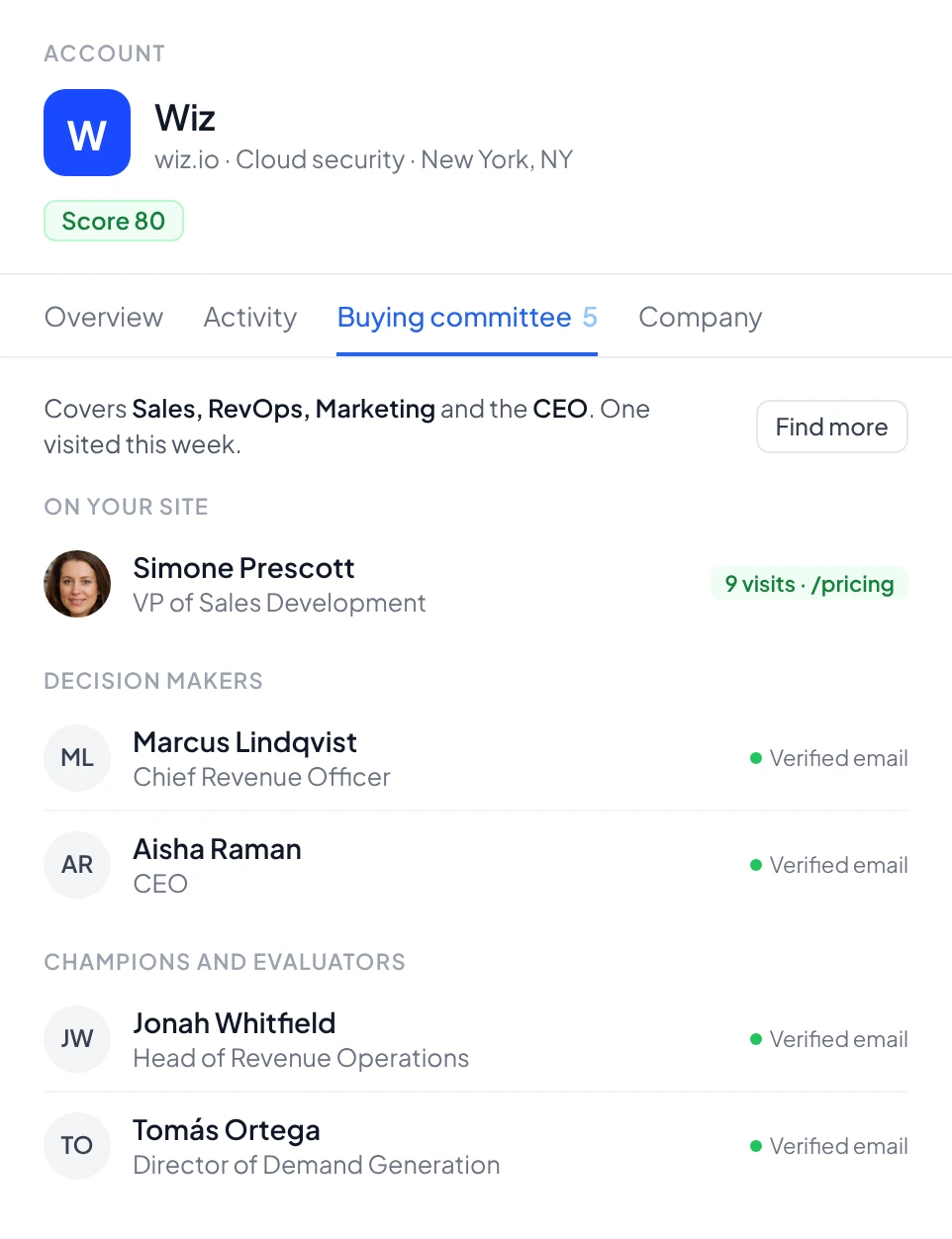
The whole committee, not a guess.
Knock2 starts from the person who visited, then finds the rest of the buying committee at that account, with verified emails, on every plan.
Reps know who was reading and who else decides, instead of picking a name from a company’s contact list.
03 · Delivery
Into your sequencer, not just your CRM.
Send each buyer to HubSpot or Salesforce with an owner, a Slack alert, and straight into Apollo, Outreach, Lemlist, Instantly, Smartlead or HeyReach.
Leadfeeder syncs to your CRM and Slack. It lists no sequencer integrations.

04 · Lead scoring
Scored before anyone looks.
Describe your ideal customer in a sentence. Every visitor and account gets a score and the reason for it, so reps start with the best fit.

Which one fits
Different jobs. Pick yours.
Choose Leadfeeder if
- Most of your buyers are in Europe, where Knock2 also stops at the company.
- You run Pipedrive, Zoho or Microsoft Dynamics as your CRM.
- A free plan covering 100 companies a month is enough for now.
Choose Knock2 if
- You sell into the US and want the person who visited, not just the company.
- Reps should reach the whole buying committee, not guess at one contact.
- Buyers should land in your sequencer the moment they visit.
Side by side
Knock2 vs Leadfeeder
Leadfeeder figures are what Leadfeeder publishes on its homepage and pricing page.
FAQ
Frequently asked questions
How is the 93% match rate measured?
The 93%* figure refers to account-level identification, meaning Knock2 can tell you which company a visitor is from 93%* of the time. It's measured against "engaged sessions," which Google Analytics defines as any visit that lasts 10 seconds or longer, or includes 2 or more pageviews.
The 62%* figure is for person-level identification (name, email, title) on US traffic, measured the same way. We publish both numbers because they answer different questions: which companies are on my site, and which individuals can I reach out to.
How is Knock2 different from Leadfeeder?
Leadfeeder identifies the company behind a visit, and says it identifies up to 45% of the companies visiting your site. It does not identify the person who visited. Its Activate plan, from €369 a month, adds verified emails and phone numbers from its contact database, so a rep still has to guess which person at the account was on the site.
Knock2 returns the person as well as the company: name, title and email for 62%* of US engaged sessions, and the company for 93%* of engaged sessions. It also finds the rest of the buying committee at the account and routes each buyer into HubSpot, Salesforce, Slack, Apollo, Outreach, Lemlist or Instantly.
How does Knock2 identify visitors on my site?
You add a small script to your site. When someone visits, Knock2 matches that visit against licensed identity data to resolve the person and the company behind it. You get name, title and business contact details.
Most visitor identification tools work from IP address alone. Knock2 draws on several identity sources rather than one. That is why it resolves more of your traffic: 93%* at the account level and 62%* at the person level on US traffic.
Can I reach individual people or just companies?
Both. Knock2 returns account-level data (the company) and person-level data (the specific individual, with name, title, work email, phone, and LinkedIn profile). Person-level identification is US traffic only, due to privacy regulations in other regions.
This is one of the main differences between Knock2 and account-only visitor identification tools: you don't have to guess which person at the account visited, or manually hunt them down in LinkedIn.
Will this work with my CRM and sales tools?
Yes. Native integrations are built for HubSpot, Salesforce, Slack, Apollo, Outreach, Lemlist, Instantly, and Clay. For anything not on that list, webhooks cover Zapier, Make, n8n, and any other tool that accepts them. Identified visitors can be routed in real time based on lead score, pages visited, firmographics, persona match, UTMs, or any combination.
Is this actually legal? How does Knock2 identify people without them opting in?
Yes. Knock2 is built on the same class of identity and analytics technology already running on most B2B websites.
Person-level identification runs on US traffic only, by design. Everywhere else, Knock2 returns company-level information only. That is how it stays within GDPR, CCPA and ePrivacy expectations. The identity data itself is licensed from established data providers.
Does Knock2 work outside the US? What about GDPR?
Person-level identification, with names, emails and contact details, is limited to US traffic by design. Account-level identification works globally. This is how Knock2 stays compliant with GDPR, CCPA and the ePrivacy Directive in Europe.
You won't see individual European or Asian visitors' personal details, but you will see which companies are visiting.
How does pricing work?
Plans start at $199/month (Startup) and scale with included credits: Pro ($349), Growth ($499), Growth Plus ($749) and Scale ($999). Identifying an account costs 1 credit, identifying a person costs 6 credits, and prospecting additional contacts at an account costs 2 credits. Every plan includes a 7-day free trial, and you can cap your usage at any time. See pricing.
See who’s behind the company name.
Join 1,000+ GTM teams turning website traffic into pipeline.
Rather talk first? Book a demo →