
Ad platforms are optimization engines. You tell them which clicks turned into something valuable, and their bidding models go looking for more people like that. In B2B the trouble is volume: a handful of demo requests a week is a thin signal to steer an auction with. Google, for example, suggests around fifteen conversions in thirty days before its models have much to learn from.
Meanwhile, your website is full of conversions you never report. Every visit from a company that fits your ideal customer profile says the ad reached the buyer you are paying to reach, and those visits happen far more often than form fills. Most of them never make it back to the ad platform, and the reason is less obvious than it sounds.
Why your server can't send them
Many paid teams already send conversions back from their server or CRM. Last month we wrote about click IDs, which make that possible for visits that arrived from an ad on a tracked link.
But a server-side conversion always has to tell the platform who the visitor was, usually with a hashed email address or a click ID. Website visitor identification mostly doesn't produce either. Most visits you can identify resolve to a company rather than a person, and a company name isn't something an ad platform can match to a click. So the visits are identified, qualified and then quietly dropped.
The browser doesn't have that problem. The ad platform's own tag is already on the page, and it already knows which ad brought the visitor there. All it needs is to be told the visit mattered, while the visitor is still on the page.
That is what we built. Website events tell your own website, in the moment, that Knock2 has identified the visitor's company, who in that company they probably are, and how well the company fits your ICP. Your ad pixels and tag manager can turn that into a conversion for every identified company, including the ones your server can't send.
What paid teams told us
This started with a request from a performance marketing agency that runs paid acquisition for several B2B software companies, including some of our customers. Their team had already wired Knock2's API into their own pipeline. What they asked for next was a version that lives in the browser, and their reasons were worth writing down.
- Send every conversion twice. Their standard practice is to send the same conversion from the server and from the browser at once, tied together with a shared event ID so the platform counts it only once. On Meta in particular they have seen, across many accounts, that the browser copy helps, because the pixel can match the visitor on the page in ways a server event can't. Meta recommends this setup itself, which it calls a redundant setup with deduplication.
- Judge the company, filter the persona. Company-level fit is usually enough to decide whether a visit counts. The ideal is to go one step further and check the visitor is the right kind of buyer too, by job function or seniority, without anything that identifies a person.
- Let each team decide what counts. Some campaigns should count every page an ideal buyer views, others one conversion per visit. That is a call each team wants to make for itself.
- Use the score, or bring your own. Some teams are happy to use Knock2's ICP score as the line. Others want the raw firmographics so they can score fit their own way.
Website events are built around those four points.
What a website event contains
Once Knock2 identifies a visitor's company, your page receives an event with:
- The company: name, domain, industry, employee range, country and LinkedIn company page.
- The persona: the visitor's likely job function and seniority for this visit, such as Engineering, Sales Executive or Information Technology Manager. It's empty when we only know the company.
- ICP fit: the company's score from your lead scoring setup in Knock2, a yes or no for whether it's a good fit, and the line you chose for that.
- Existing customer: whether the company is already on your customer list, so you can keep current customers out of an acquisition metric.
- The visit: a visit ID that stays the same across pages, whether this is the first event in the visit, and the page it's for.
What it never contains is who the visitor is. No name, no email, no phone number, no LinkedIn profile. Any script running on your site can read these events, so they describe a company and a role, never a person.
It is also fast. Knock2 identifies the company within seconds of the first page loading, and the event fires as soon as the company is identified and scored.
What you can do with it
- Report ICP visits as conversions. Fire a LinkedIn, Meta or Google Ads conversion only when the company is a good fit and not already a customer, and give the bidding models a signal with real volume behind it.
- Target the right buyer, not just the right company. Count only visits from the functions and seniority levels you sell to, so the platform learns from your actual buying committee rather than from anyone at a target account.
- Deduplicate against your server events. Use the visit ID as the event ID on both the browser and server copies of a conversion.
- Measure account penetration. Teams running account-based programs want to know whether more of their target accounts are visiting over time, and from which channels. Website events make it easy to send that into the analytics you already use.
- Personalize the page. Show a different headline, case study or call to action to a good-fit visitor than to a student doing research.
Setting it up
Website events are off until a workspace admin switches them on, under Settings > Script > Website events. There are three settings.
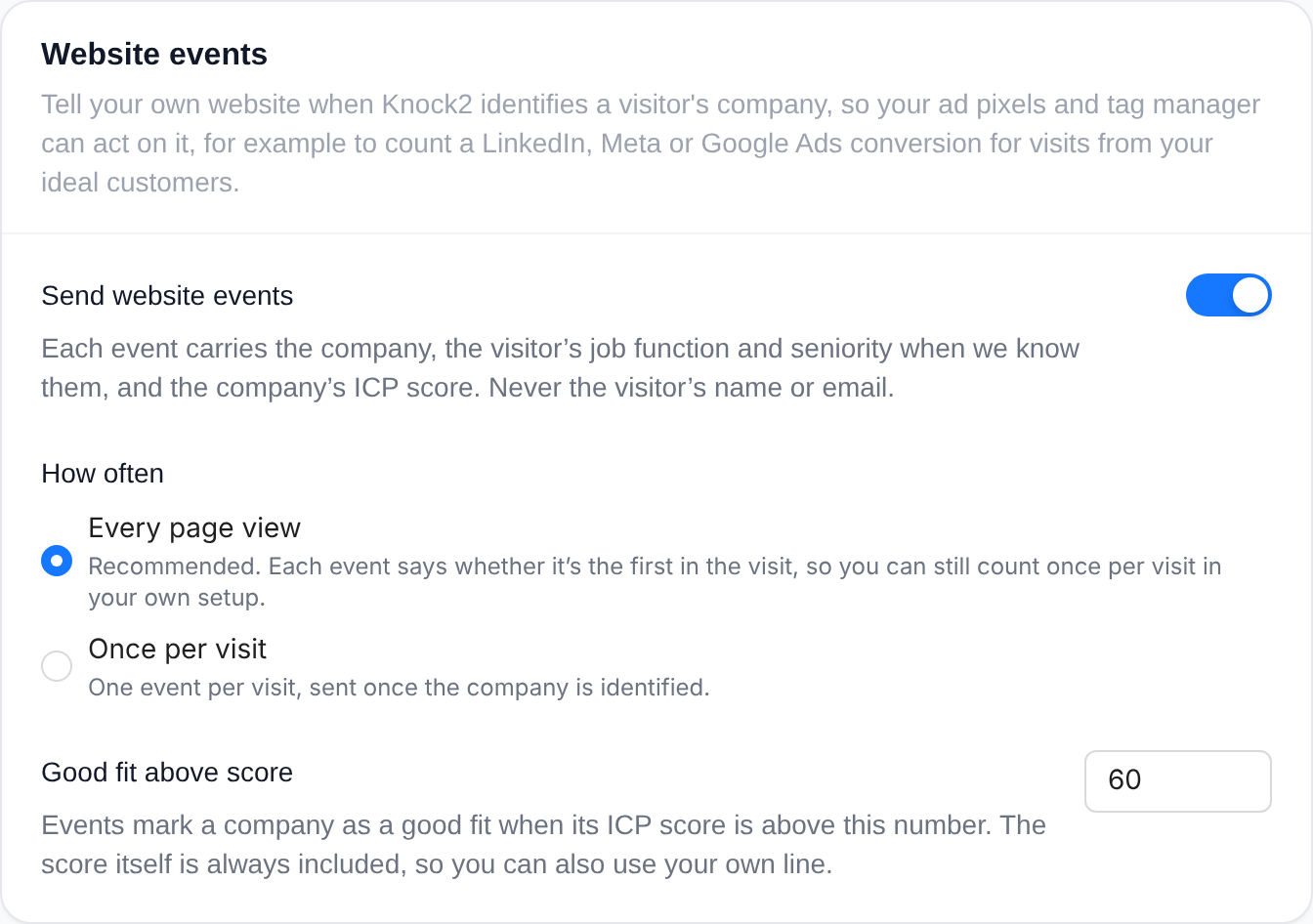
- Send website events switches them on.
- How often is either every page view, where each event says whether it's the first in the visit, or once per visit.
- Good fit above score sets where a company counts as a good fit. It defaults to 50, the same line as the Hot Leads view in your dashboard. The score itself is always included, so you can draw your own line instead.
Most teams wire the event up in Google Tag Manager, where it arrives as knock2_visitor_identified: a Custom Event trigger on that name, firing when knock2.icp.is_fit is true, attached to your LinkedIn Insight Tag, Meta Pixel or Google Ads conversion tag. If you prefer code, it's a single listener:
window.addEventListener("knock2:visitor_identified", function (e) {
  var visit = e.detail;
  if (visit.first_in_session && visit.icp.is_fit && !visit.is_existing_customer) {
    window.lintrk("track", { conversion_id: 1234567 });
  }
});
Visitors who have opted out, including browsers sending a Global Privacy Control signal, never produce an event, and neither do pages you have excluded.
Where this fits in your paid stack
Website events are the newest piece of a set that paid teams are already putting together with Knock2. Each one answers a different question, and they work best together.
- UTMs tell you where traffic came from, by campaign, source and creative. Knock2 keeps the landing UTMs on every identified account and contact, so you can filter and report on them.
- Click IDs are how you answer back from your server. Knock2 keeps the Google, Meta, LinkedIn, Microsoft and TikTok click ID from every identified visit, so you can upload offline conversions days later, once you know what the visit turned into.
- Website events answer in the moment, in the browser, for every identified company, including the visits a server event can't match.
- The API and webhooks are for everything you build yourself. Teams pull identified visitors on a schedule into their warehouse or Segment, apply their own fit rules and route the results to ad platforms and reporting. Others subscribe to webhooks for new identifications instead of polling, and pass their own visitor IDs in so they can join our data to theirs without matching on names.
The most sophisticated teams take that last step further. They combine what Knock2 knows about a visit with what eventually happened in their CRM, and build models that estimate how valuable a visitor is likely to be from their first few page views, then optimize their campaigns toward that value rather than toward any single conversion. All of the inputs for that are available through the API today.
Try it
Website events are available on every plan. If you are already a customer, an admin can switch them on under Settings > Script > Website events. If you are not, start a free trial and see which companies your ads are really reaching.


