
Here is the shape of the problem, and almost every B2B paid team has it.
Each individual campaign produces a handful of form fills a month. Your account total might be healthy, but the bidding models do not learn at account level, and a campaign is where the learning happens. The more campaigns you run, and the tighter you target, the thinner each one's signal gets. Run a proper ABM motion and you can end up with a campaign aimed at forty companies whose monthly conversion count is a rounding error.
The models want roughly ten times what those campaigns give them before they have much to learn from. So they learn from almost nothing, drift toward the cheapest clicks they can find, and you spend the next quarter arguing about creative.
Meanwhile, the thing you actually wanted happened hundreds of times. A target account landed on your pricing page. An engineering director at a 400 person company read your docs for nine minutes and left. None of it reached Google, Meta or LinkedIn, because nobody filled in a form.
This is a guide to closing that gap. How to turn identified website visits into conversions the ad platforms can optimize toward, in real time from the browser and after the fact with click IDs, and how to tell whether it actually worked.
The idea: the form should not be your only conversion
Every major ad platform is an optimization engine. You report conversions, the models go looking for more people who resemble the ones who converted. Smart Bidding, Advantage+ and their equivalents all run on that loop, and the loop needs volume. Google's guidance for Display suggests around fifteen conversions in thirty days before its models have much to work with. Meta describes a similar learning phase.
Per campaign, B2B demand gen rarely clears that bar on form fills alone. So the trick is not to find more form fills. Keep the form conversion exactly as it is, and add a second one underneath it: a qualified visit from a company you want to sell to.
That event is not a sale and not a demo. What it says is narrower and still useful: this click reached the kind of buyer we are paying to reach. And it happens far more often than a form fill does, which is exactly what the models are short of.
Three things have to be true before you can report it.
- You can tell who the visit was. Website visitor identification resolves an anonymous visit to a company, and sometimes to a person.
- You can judge whether it was worth anything. Fit scoring, firmographics, an account list, whatever you trust.
- You can get the event back to the platform in a form it will accept. This is the part teams get stuck on, and there are two separate routes.
Step 1: decide what counts, before you send anything
This is the step that decides whether the whole thing works, and it is the one most teams rush.
The platform will optimize toward whatever you tell it was good. Tell it that any identified visit is good, and it will go and find you traffic that is easy to identify: big companies, office IP ranges, agencies, students at large universities, your own competitors doing research. You will have successfully taught it to buy the wrong clicks, faster, with more confidence.
So write the definition down before you build anything. A workable one has three parts.
- Company fit. A score above a line you chose, or membership of a target account list. Exclude existing customers, otherwise your support traffic becomes an acquisition signal.
- Who the visitor is. Company-level fit is usually enough to start. If you can also filter on job function and seniority, do it, so the model learns from your actual buying committee rather than from anyone at a target account.
- What they did. A bounce on a blog post is not the same event as four minutes on pricing. Combine the identification with a page or engagement condition you already trust.
A useful sanity check: if you exported last month's qualifying visits and handed the list to a sales rep, would they be happy to work it? If not, the definition is too loose, and no amount of plumbing downstream will fix that.
Step 2: the real-time route (send it from the browser)
The first route fires while the visitor is still on the page.
The ad platform's own tag is already there. It already knows which ad brought this visitor, because it set the cookie when they clicked. It does not need to be told who the visitor is. It only needs to be told that this visit mattered, right now.
So the mechanism is simple: your identification tool publishes a browser event the moment it resolves the visitor's company, your tag manager listens for it, checks your definition from step 1, and fires a conversion tag.
In Google Tag Manager that is a Custom Event trigger with a couple of Data Layer Variables as conditions, attached to your LinkedIn Insight Tag, Meta Pixel or Google Ads conversion tag. In code it is one listener:
window.addEventListener("knock2:visitor_identified", function (e) {
  var visit = e.detail;
  if (visit.first_in_session && visit.icp.is_fit && !visit.is_existing_customer) {
    window.lintrk("track", { conversion_id: 1234567 });
  }
});
What this route is good at: volume, and immediacy. It fires on every visit you can identify, and it fires within seconds, while the session is still open. Nothing has to be matched back to a click afterwards and nothing has to wait for a nightly sync, which makes it the simplest way to get a campaign over the volume it needs to learn.
What it is not good at: anything you learn later. The visit is reported as it happens, at a fixed value, before you know whether it turned into a meeting or a deal. It also runs in the browser, so blocked tags and privacy signals cost you some of it.
Step 3: the offline route (hold the click ID, send it later)
The second route runs on a delay, and it exists because the most valuable thing about a visit is usually something you find out weeks afterwards.
When somebody clicks a paid ad, the platform appends its own token to the landing URL. Google calls it a gclid (plus gbraid and wbraid on some iOS traffic), Meta uses fbclid, LinkedIn li_fat_id, Microsoft msclkid, TikTok ttclid. The token is opaque and carries nothing you can read. It is the platform's receipt for that click, and the platform will take it back later with a conversion attached. That hand-back is an offline conversion import. We wrote a full guide to click IDs if you want the detail.
The pattern is: capture the click ID on the landing visit, store it against the visitor, and upload it when something happens that tells you what the click was really worth.
- Identified as an ICP account: upload immediately, low value.
- Became a contact, or a rep got a reply: upload at a higher value.
- Became an opportunity: upload at the value you would actually pay to acquire.
That last one is the version that moves return on ad spend rather than just conversion counts, because it stops the model from treating a tire-kicker and a six figure opportunity as the same event.
Three ways to get it there
Through HubSpot. Once an ad account is connected, HubSpot syncs conversion events back to Google, LinkedIn and Meta off its own click ID properties. The piece most teams lack is a click ID on the record at all, because HubSpot only captures one when somebody submits a form on the same device in the same session. If your identification tool writes the click ID onto the contact, HubSpot's ads tooling does the rest and you build nothing.
Through your CDP. If you already run Segment or something like it, you have the fan-out built. Pipe identified visitors in with the click IDs attached, and the ad destinations already in your workspace take it from there, so you are configuring a destination rather than writing an integration. Check that the specific destination you want accepts a click ID as an identifier before you count on it, since not all of them do.
Through the platform APIs. Most work, most control. Google Ads takes click ID conversion uploads directly, Meta's Conversions API takes fbc, and LinkedIn's Conversions API accepts the li_fat_id as a user identifier. Pull the click IDs out of your identification tool's API or webhooks, join them to whatever happened in your CRM, and post the conversions yourself on a schedule.
Four limits worth knowing before you build
- Clicks expire. Google will not accept a GCLID conversion more than ninety days after the click. If your sales cycle is longer, report an earlier milestone rather than the closed deal.
- Scheduled imports look back less far than you think. Google's scheduled imports from a CRM or database pick up conversions from the last fourteen days on each run, where a file upload reaches ninety. Cadence matters more than the ceiling suggests.
- Click IDs are case sensitive. Anything in the path that lowercases strings will break the match silently.
- Consent applies at capture, not at upload. A visitor who has opted out, including one whose browser sends a Global Privacy Control signal, should never have a click ID stored in the first place.
Step 4: start as a secondary conversion, then promote it
Do not point Smart Bidding at a brand new signal on day one. Send it as observation only first, watch what it correlates with, and promote it once you believe it.
In Google Ads that is literally a setting: conversion actions are primary or secondary, and secondary actions report without being used for bidding. Watch out for one trap, which is that an action inside a custom goal used for bidding will influence bidding regardless of the primary or secondary label. On Meta, create it as its own custom conversion and leave your campaigns optimizing toward the existing event while you watch. On LinkedIn, set up a separate conversion action rather than folding it into your lead conversion.
Give it enough volume to judge, which usually means two to four weeks. Then look at whether the accounts behind those conversions are the ones your sales team wants. If they are, promote the action to primary and let the bidding models have it. If they are not, go back to step 1 and tighten the definition. That loop is the whole job.
Step 5: deduplicate before you turn both routes on
Running real time and offline together is the right end state, and it is also the easiest way to double count.
- Share an event ID across browser and server copies of the same conversion. Meta and LinkedIn both deduplicate on it. A visit ID that stays stable across the pages of a session works well as the basis for one.
- Upload each click ID once per conversion action. If two systems are both sending, turn one off rather than hoping the platform sorts it out.
- Keep the two routes at different stages. The clean split is: real time reports the qualified visit, offline reports what the visit became. Same visitor, different events, no overlap.
Step 6: measure it honestly
You will see your conversion count go up. Of course you will. You just invented a new conversion that fires far more often than the old one. That number is not evidence of anything, and treating it as the result is how this tactic gets a bad reputation.
Here is what to look at instead.
- Cost per qualified visit, by campaign. Your new leading indicator. Watch the trend after the signal goes primary, not the level.
- The mix of accounts in those visits. Are you getting more of the companies you want, or just more volume? A list of the top fifty accounts your campaigns reached last month, before and after, is more informative than any in-platform chart.
- Cost per meeting and pipeline per thousand spent. The lagging metrics that actually pay. These move later than you want them to, which is why you need the two above as well.
- A holdout. If you have the budget to run one campaign on the old signal, do it. It is the only way to tell the difference between the change working and the quarter being good.
On expectations: an agency we work with ran this pattern for a client before we built support for it, using a visitor identification tool and a Zapier workaround to get click IDs uploaded. They reported going from one or two ICP visitors a day to ten to fourteen on the same budget. That is their number, on their account, not a benchmark, and the honest version of the claim is narrower than a headline percentage: you are giving the bidding models a signal with ten times the volume and a much tighter definition of a good outcome. What they do with it depends on your campaigns, your budget and how well you did step 1.
What goes wrong
- The definition is too loose. The single biggest failure. Being able to name a visitor is not the same as that visitor being worth bidding toward, and the platform cannot tell the difference.
- Nobody excluded existing customers. Your renewal traffic quietly becomes an acquisition target.
- The landing page does not run the script. Paid campaigns love standalone landing pages on a different host. No script, no identification, no click ID.
- Personal data gets sent alongside the click. Do not attach a hashed email to a probabilistic identification. The click is deterministic, the identification is a judgement, and mixing the two is both a data quality problem and a privacy one.
- It gets built once and never revisited. The definition from step 1 should be reviewed against closed won accounts every quarter.
Doing this with Knock2
Knock2 identifies the companies and people visiting your website, scores them against your ideal customer profile, and gives you both routes out of the box.
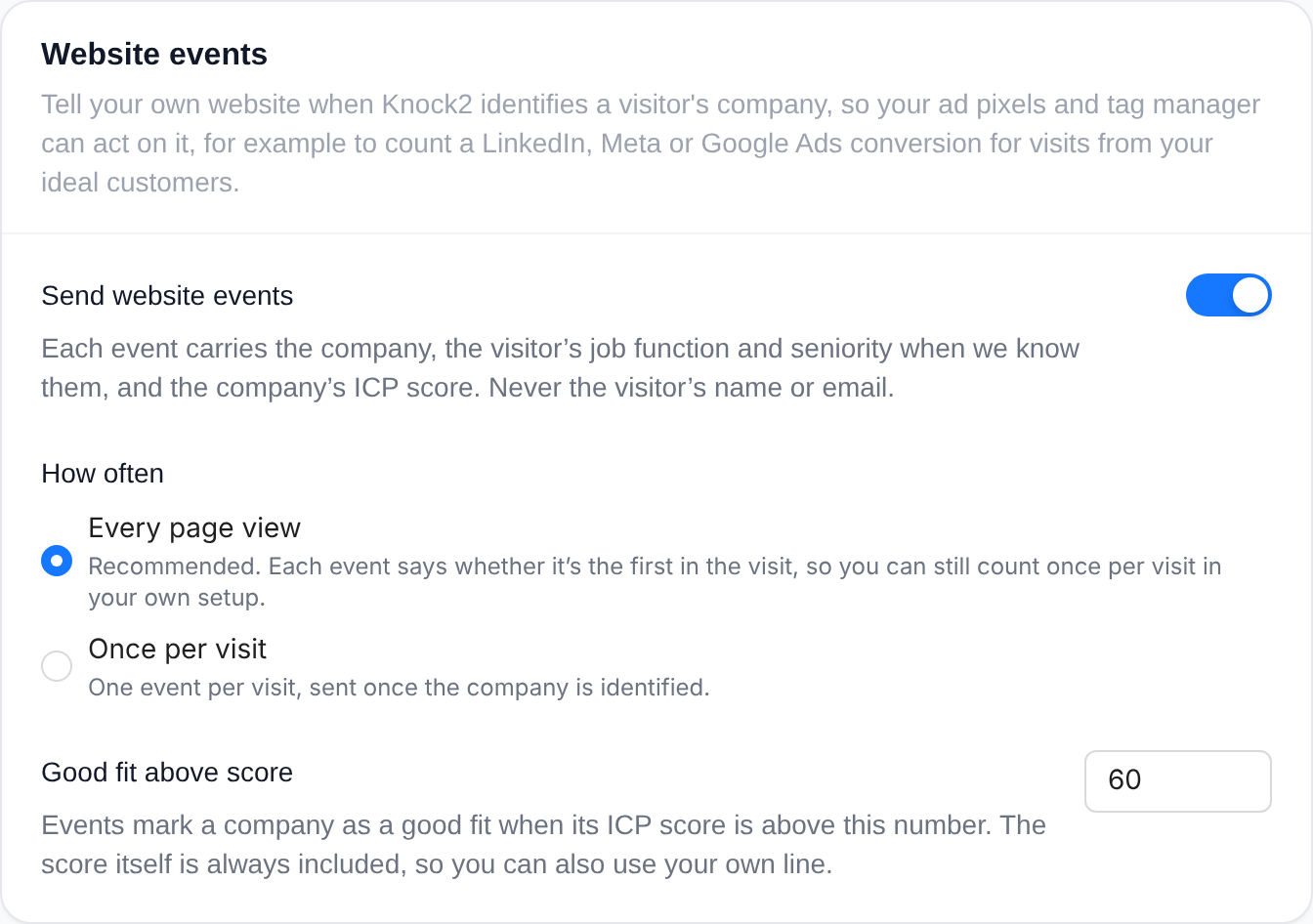
For the real-time route, website events publish a browser event the moment a visitor's company is identified, carrying the company, the visitor's likely job function and seniority, the ICP score and whether the company is already a customer. Never a name, email or profile, because any script on your page can read it. An admin switches it on under Settings, Script, Website events, picks every page view or once per visit, and sets the score that counts as a good fit.
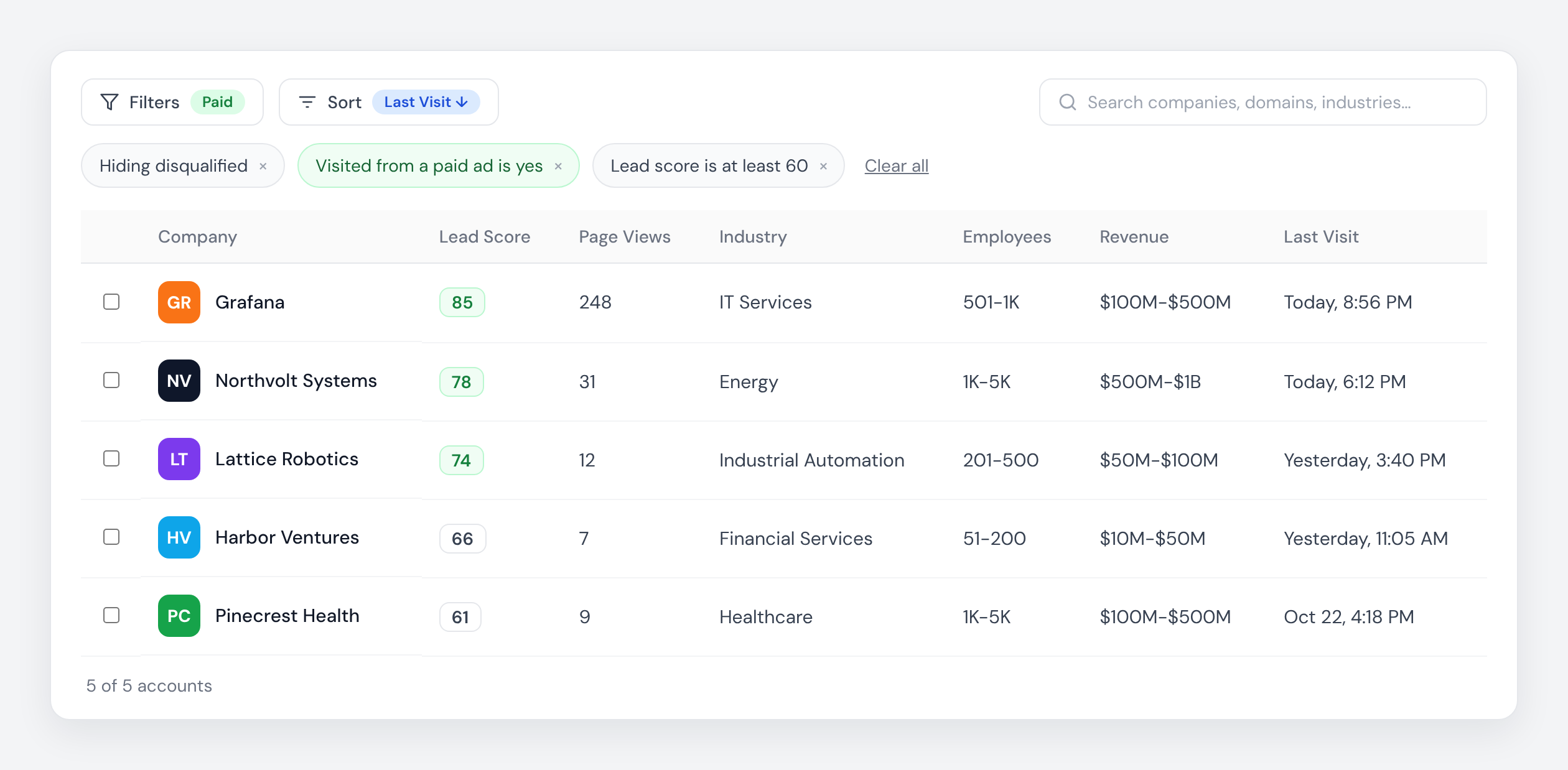
For the offline route, Knock2 captures the Google, Meta, LinkedIn, Microsoft and TikTok click ID on every identified visit and keeps it on both the contact and the account, with the time of each click, so a buyer who arrived from a Google ad one week and a LinkedIn ad the next has both on record. Filter either tab by "Visited from a paid ad", combine it with a lead score, and you have your step 1 list.
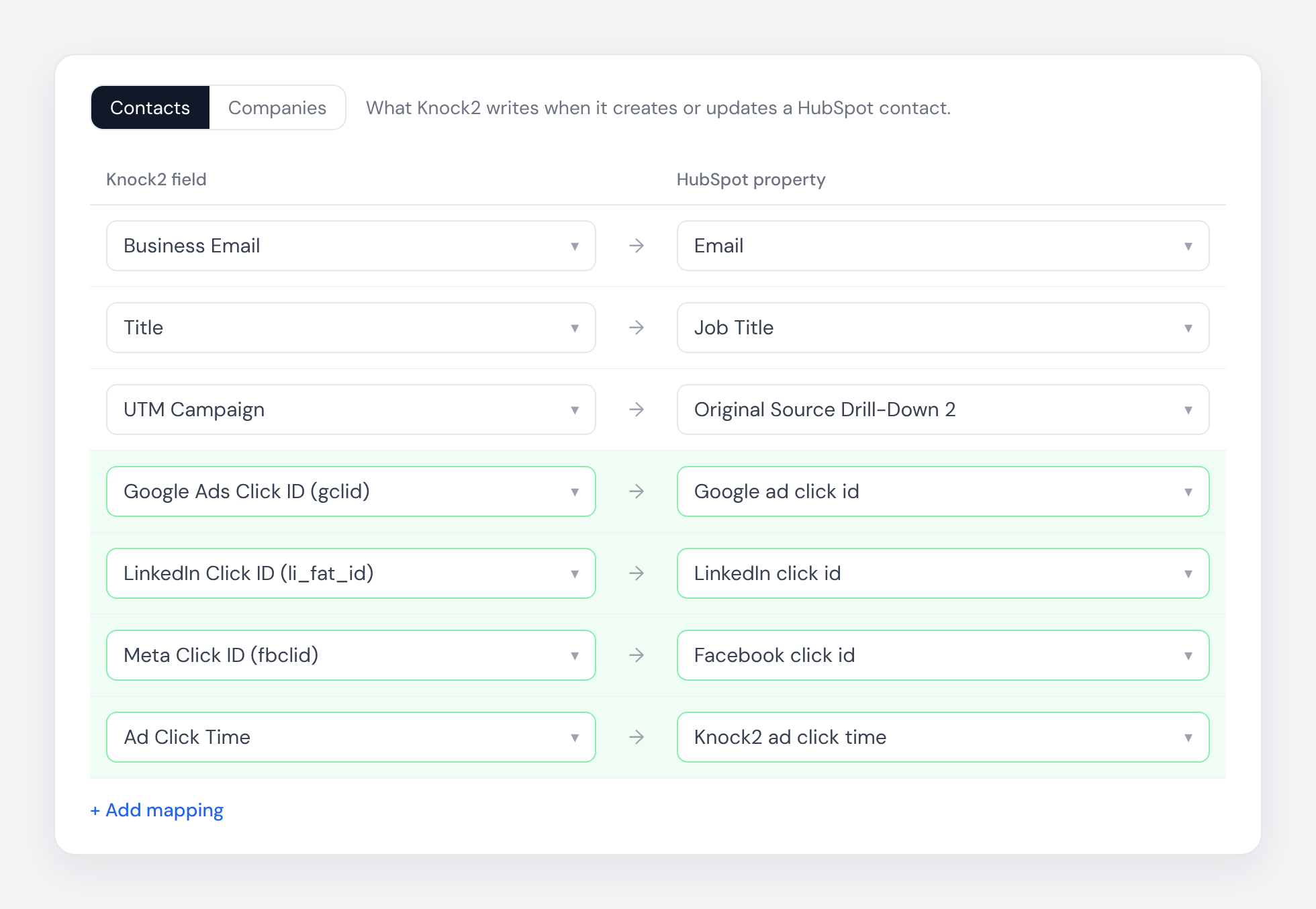
From there the click IDs are source fields in Knock2's HubSpot and Salesforce field mapping, so you can map them onto HubSpot's own click ID properties and let its ads tooling sync the conversions. Nothing is mapped unless you choose it. If you run Segment, Knock2 posts every identification into it as a source, click IDs included, so your existing ad destinations can do the fan-out. And they are in every webhook and API payload if you would rather upload conversions yourself.
Both are part of identification rather than add-ons, so they are available on every plan. Opt-outs and Global Privacy Control signals are respected at capture, and excluded pages never produce either.
If you are already a customer, start with the Accounts tab filtered to paid ad visits and see how many qualified visits your campaigns produced last month that you never reported. If you are not, start a free trial and find out what your ad budget is really buying.


